![Frame-1.png]](https://help.nouxdigital.com/hs-fs/hubfs/Frame-1.png?height=17&name=Frame-1.png)
Duplicating sales rooms or using templates is a quick and effective way to streamline your workflow and ensure consistency in client interactions.
You will learn!
-
How to duplicate a sales room for reuse.
-
How to use templates to speed up room creation.
-
Tips for managing templates and ensuring accessibility.
How to Duplicate a Sales Room
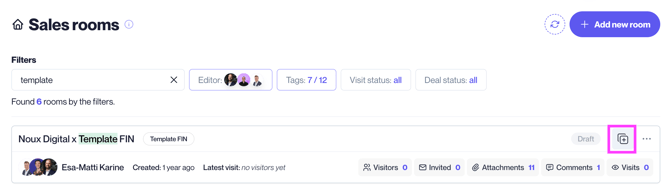
Pro Tip! Duplicate colleagues’ rooms. Find and duplicate rooms created by colleagues:
-
Use the Editors menu next to the search bar on the dashboard.
Duplicating a sales room allows you to reuse content and settings while making adjustments for new clients.
Step-by-step:
-
Open the room to duplicate:
-
Navigate to the sales room you wish to duplicate.
-
-
Duplicate the room:
-
Select Duplicate from the top menu.
-
-
Name the new room:
-
Enter a name for the new room, typically the client’s name.
-
-
Adjust the contents:
-
Add or remove documents, videos, and other materials as needed.
-
-
Review settings:
-
Ensure room settings are updated to match the new client’s needs.
Note: Comments, participants, and analytics are not transferred to the new room.
-

How to use Templates to Create Sales Rooms
Templates simplify the process of building tailored sales rooms for specific client groups.
Step-by-step:
-
Locate a template:
-
Find pre-made templates created by your organization in the Templates section or by searching the Editors menu.
-
-
Duplicate the template:
-
Click Duplicate to create a new room based on the template.
-
-
Add client-specific content:
-
Personalize the room by adding materials, videos, and links specific to the client.
-
-
Save changes:
-
Always duplicate the template before making modifications to preserve the original for future use.
-