![Frame-1.png]](https://help.nouxdigital.com/hs-fs/hubfs/Frame-1.png?height=17&name=Frame-1.png)
Ask AI helps you answer customer questions in seconds using the content available inside the room — ensuring fast, relevant, and reliable communication.
You will learn!
-
How to reply to customers using Ask AI
-
How Ask AI selects answers and handles unknown questions
-
How to configure Ask AI settings, materials, and behavior
Responding to Customers with Ask AI
In the Discussion area of the Digital Sales Room, you can now reply with Ask AI.
Ask AI:
-
Generates answers within seconds
-
Uses only the materials available inside the Sales Room
-
Allows the seller to edit or refine the answer before sending
Configuring Ask AI
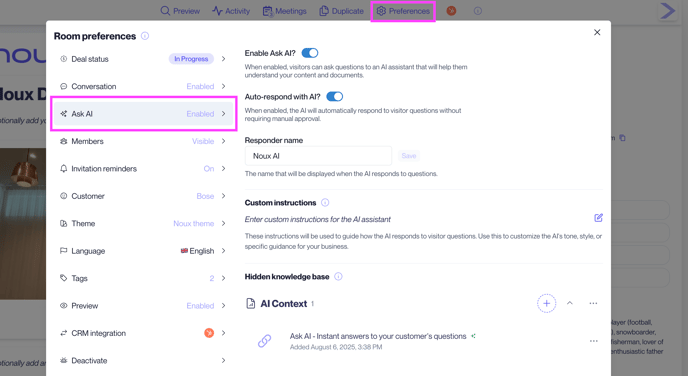
Find Ask AI controls under Preferences → Ask AI.
There you can:
-
Enable Ask AI for the room
-
Rename the AI assistant
-
Choose automatic responses
-
Add PDFs, links, spreadsheets, and other reference materials
-
Adjust prompts to shape the AI’s tone and behavior